Power of interaction - Solving for reptitive tasks in campaign generation
We transform ideas into
visual masterpieces.
Experimentation at the speed of thoughts // Interactive campaign builder for marketers
Experimentation at the speed of thoughts // Interactive campaign builder for marketers
Experimentation at the speed of thoughts // Interactive campaign builder for marketers
Plotline | 2024
Plotline | 2024
Be it creating the most optimal onboarding flow for new users, improving feature adoption or bringing delight via gamification and rewards to their apps, growth teams need to experiment with a lot of lot of ideas and then determine what is working for their users.
How to enable them to launch such experiments at hyper-speed with complete confidence and reliability
Be it creating the most optimal onboarding flow for new users, improving feature adoption or bringing delight via gamification and rewards to their apps, growth teams need to experiment with a lot of lot of ideas and then determine what is working for their users.
How to enable them to launch such experiments at hyper-speed with complete confidence and reliability
Be it creating the most optimal onboarding flow for new users, improving feature adoption or bringing delight via gamification and rewards to their apps, growth teams need to experiment with a lot of lot of ideas and then determine what is working for their users.
How to enable them to launch such experiments at hyper-speed with complete confidence and reliability

Should using AI tools feel like talking to a godly superpower, or a partner that solves problems with you?
Why did we do this? To make marketers more confident than ever in launching experiments at scale
Should using AI tools feel like talking to a godly superpower, or a partner that solves problems with you?
Why did we do this? To make marketers more confident than ever in launching experiments at scale
CONTEXT
CONTEXT
What does Plotline do?
What does Plotline do?
What does Plotline do?
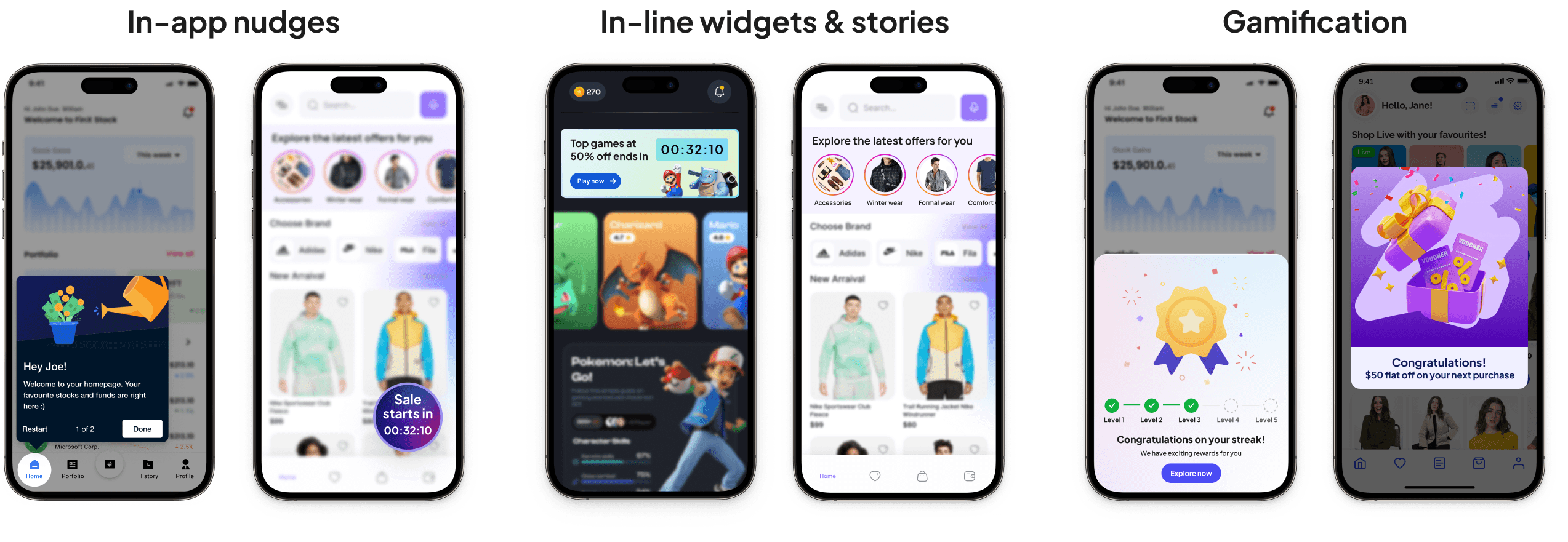
Plotline helps growth teams at consumer apps with onboarding, activation, adoption and retention use cases by letting them build elements like stories, in-line widgets, floating buttons, spotlights, quizzes, scratch cards and much more - without code. We have built a platform for marketers to enable them to nudge the right user at the right time to perform the intended action
PROBLEM
Our users were facing critical issues in creating campaigns
Our users were facing critical issues in creating campaigns
Our users were facing critical issues in creating campaigns
Users from some of the biggest consumer brands of India like Dream11, Niyo, CoinDCX, Jar, Khatabook use our platform daily to create in-app engagement campaigns. The more time they spend on creating any campaign, the more delayed the launch and thus this translates to a delay in improving the adoption, activation and retention of their end users.
Not able to match their internal designs fully on UI elements created via Plotline
Confusion around inputs, units and dimensions while creating content
Taking too long to create and launch a campaign
We needed to understand deeper the problems in our existing workflow and what exactly to work on
Secondary & Primary research
Understanding the current state of campaign creation
Benchmarking against similar workflows
Conducting usability studies with users on the existing flows to discover apparent and latent needs
Scoping and Solutioning
Defining the scope of the solution
Iterations and internal consolidation
Designs of the improved experience
Feedback, Iterate & Validate
Collecting feedback from new and power users
Iterating based on feedback
Launch and validation
Understanding existing workflows, benchmarking, uncovering any latent aspirations
I did an in-depth UX audit of the existing workflow
I did an in-depth UX audit of the existing workflow
I did an in-depth UX audit of the existing workflow
I worked closely with Growth managers, Marketers and Product managers to understand the caveats of the current campaign creation experience. along with a lot of insights from Plotline's support and customer success teams to get a comprehensive view of the problem space.
I worked closely with Growth managers, Marketers and Product managers to understand the caveats of the current campaign creation experience. along with a lot of insights from Plotline's support and customer success teams to get a comprehensive view of the problem space.
I worked closely with Growth managers, Marketers and Product managers to understand the caveats of the current campaign creation experience. along with a lot of insights from Plotline's support and customer success teams to get a comprehensive view of the problem space.
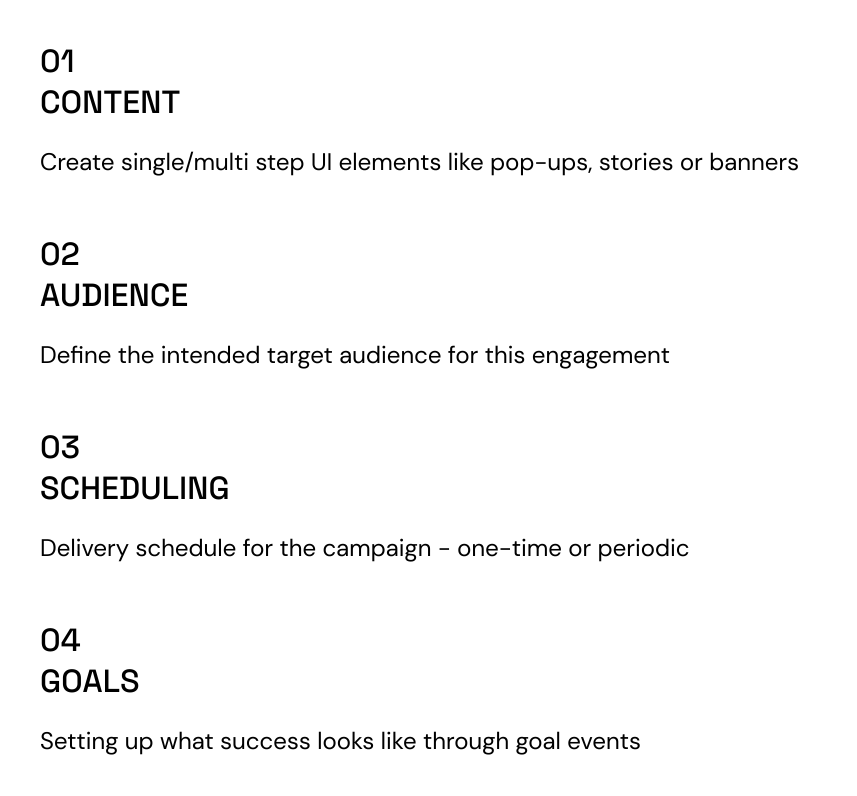
Step 1 - Content
Step 1 - Content
Step 1 - Content
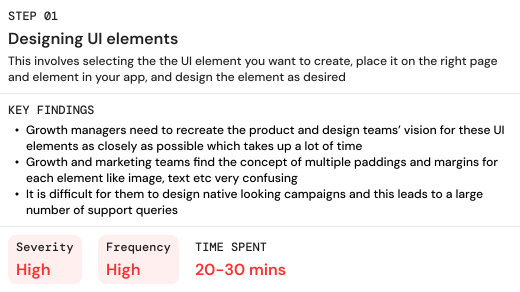
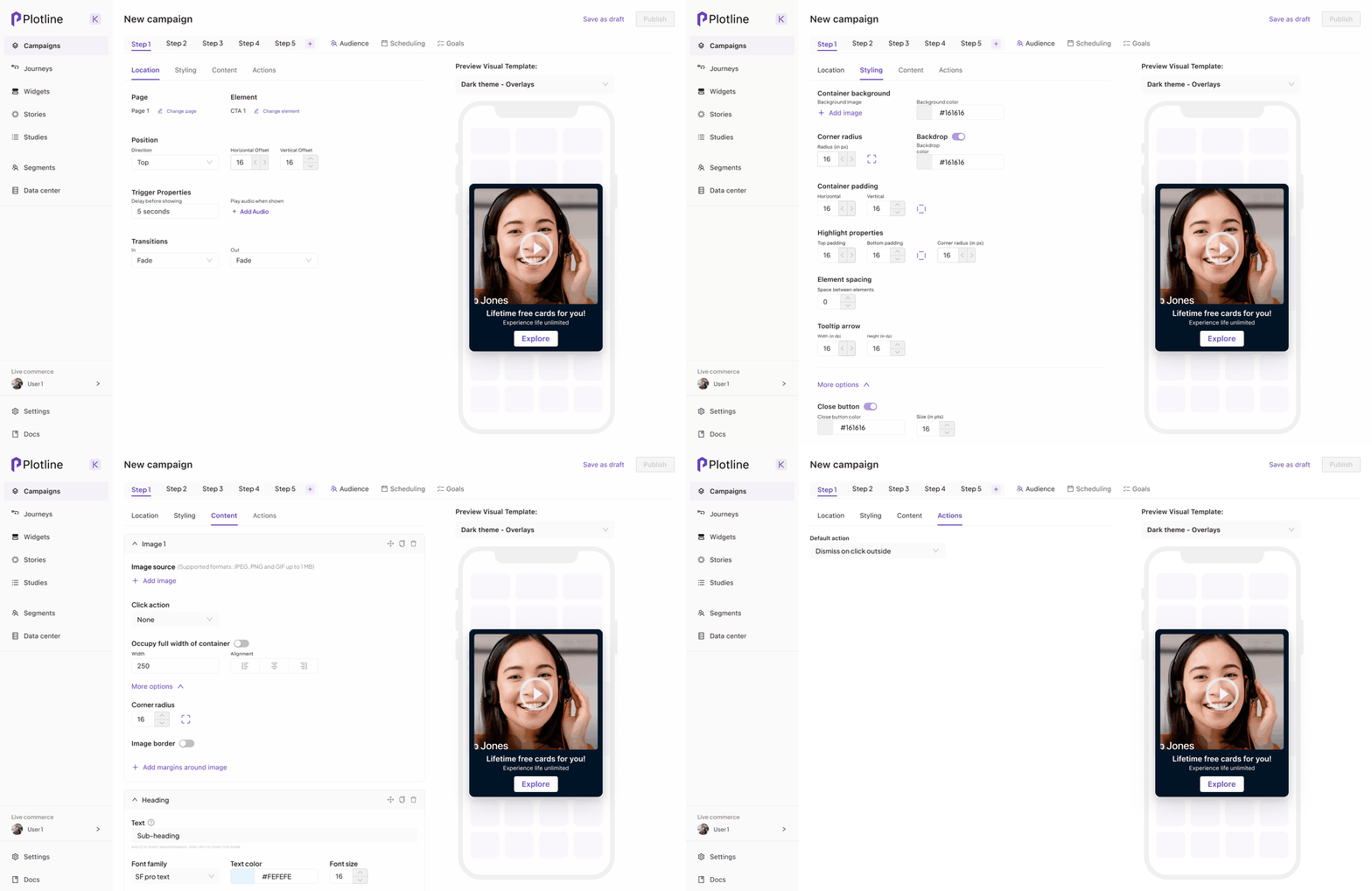
Here's how the content section was built on the platform
Here's how the content section was built on the platform
Here's how the content section was built on the platform
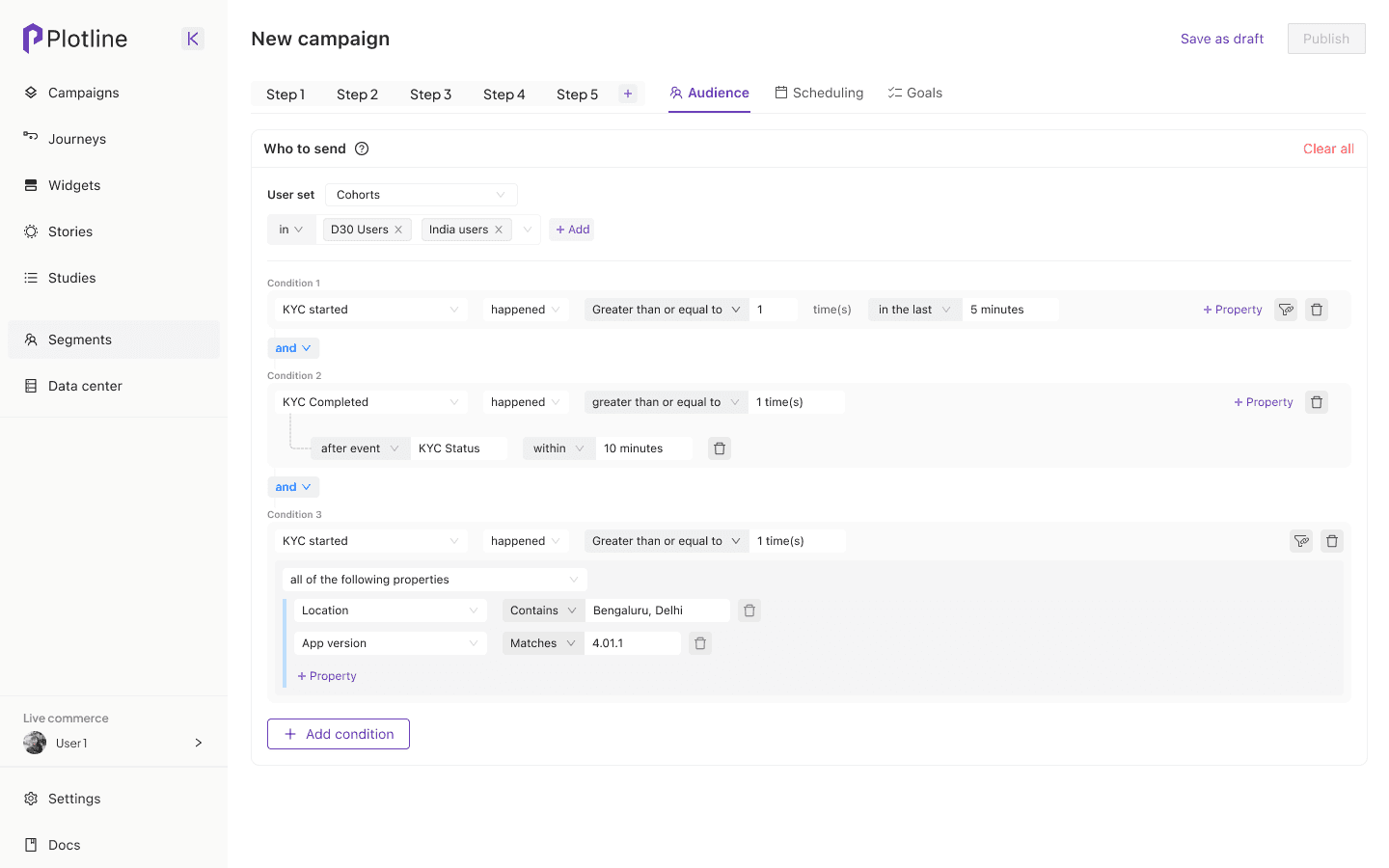
Step 2 - Audience
Step 2 - Audience
Step 2 - Audience
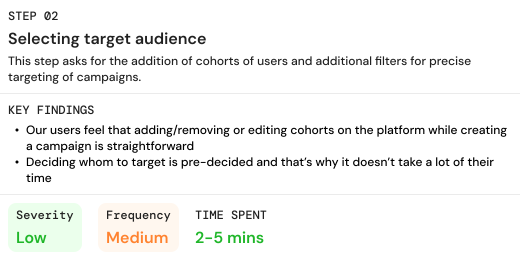
Here's how Audience section was built on the platform
Here's how Audience section was built on the platform
Here's how Audience section was built on the platform
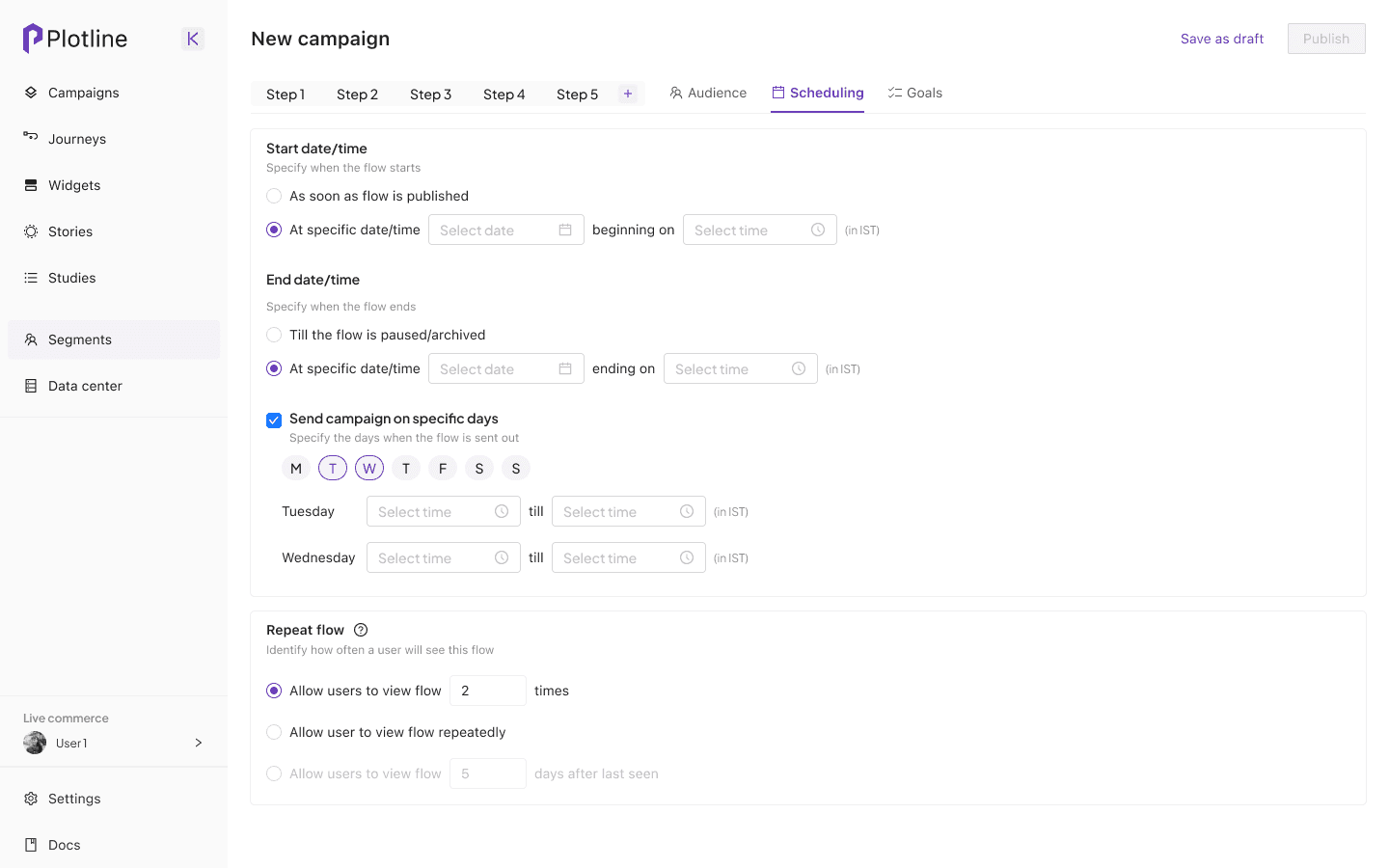
Step 3 - Scheduling
Step 3 - Scheduling
Step 3 - Scheduling
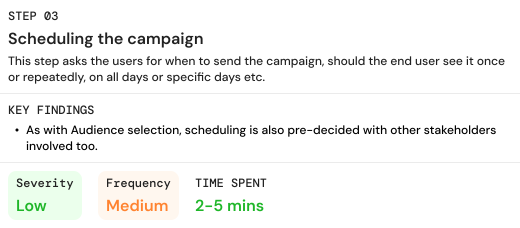
Here's how Scheduling section was built on the platform
Here's how Scheduling section was built on the platform
Here's how Scheduling section was built on the platform
Step 4 - Goals
Step 4 - Goals
Step 4 - Goals
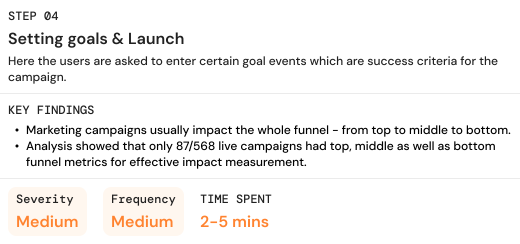
Here's how Goals section was built on the platform
Here's how Goals section was built on the platform
Here's how Goals section was built on the platform
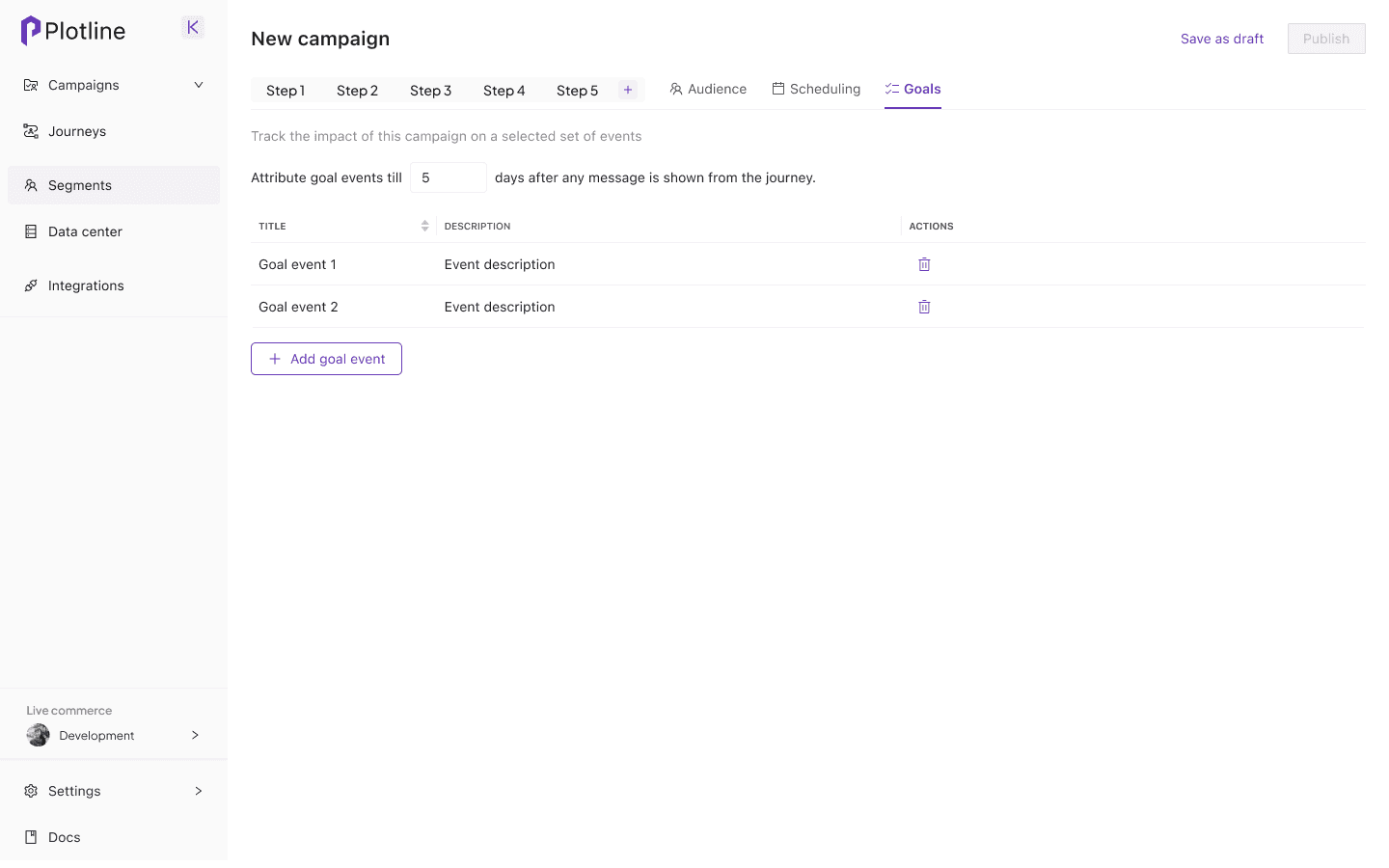
Content creation (Step 1) was the biggest factor which led to increased time to create and launch campaigns. To dive deeper, I conducted contextual inquiries with users from 6 orgs to understand at an elemental level what was taking up users time and adding to complexities in this step.
Key areas of improvement in Step 1 - Content builder
Key areas of improvement in Step 1 - Content builder
Key areas of improvement in Step 1 - Content builder
It was difficult to find the exact element users wanted to edit
Due to the high customisability of UI elements like modals, tooltips, widgets etc., there are a lot of elements like Heading, image, body, buttons
Selecting one of these to edit became difficult due to too much nesting in layers.
Auxiliary functions like re-ordering, deleting, and adding elements were difficult to access
Due to the high customisability of UI elements like modals, tooltips, widgets etc., there are a lot of elements like Heading, image, body, buttons
Selecting one of these to edit became difficult due to too much nesting in layers.
Auxiliary functions like re-ordering, deleting, and adding elements were difficult to access
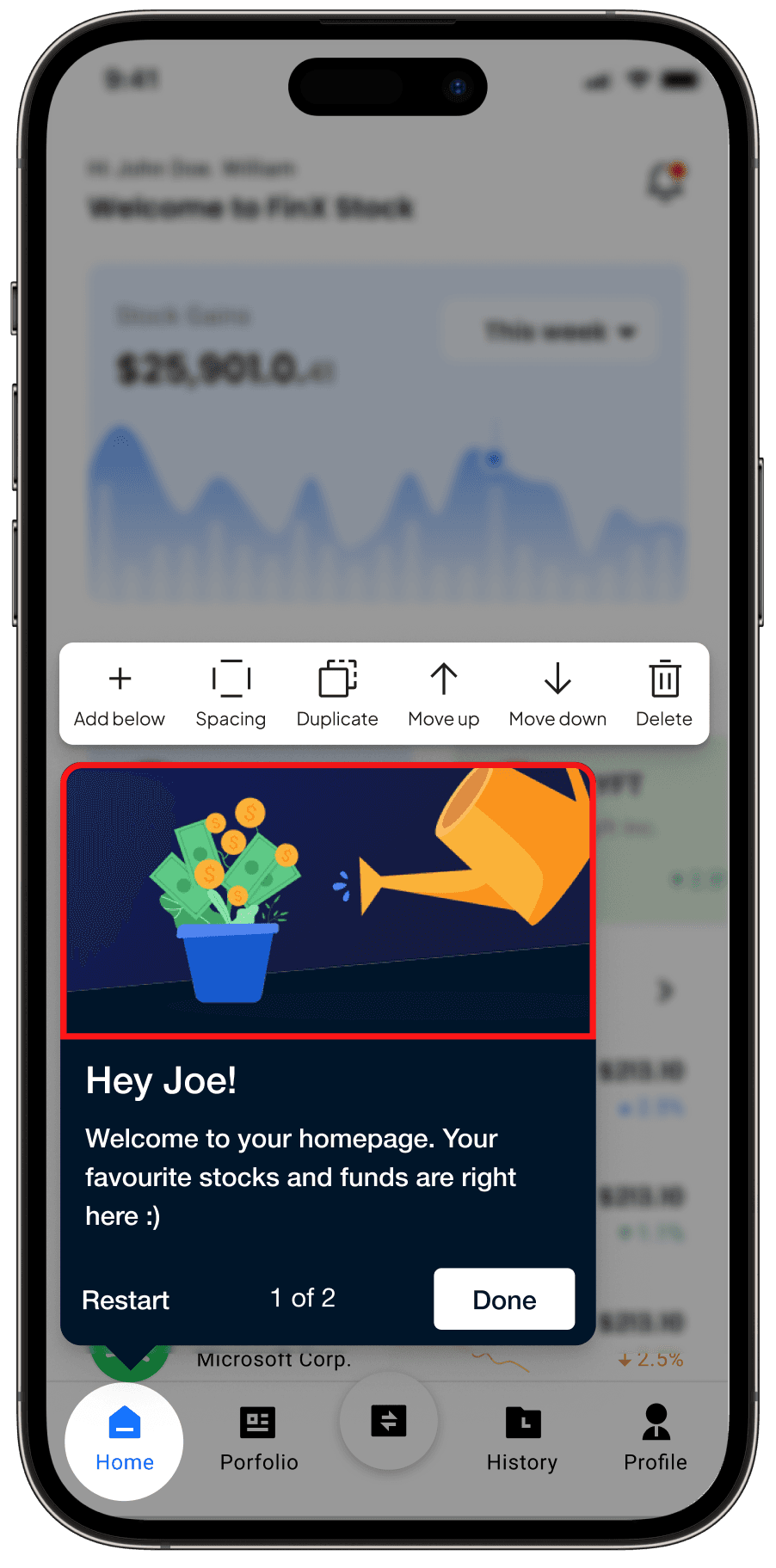
Contextual toolbars for different elements
Accessing these functions via accordions for the respective element was both cumbersome as well as not precise.
We needed to give a more efficient way to perform these actions with instantaneous feedback
Accessing these functions via accordions for the respective element was both cumbersome as well as not precise.
We needed to give a more efficient way to perform these actions with instantaneous feedback
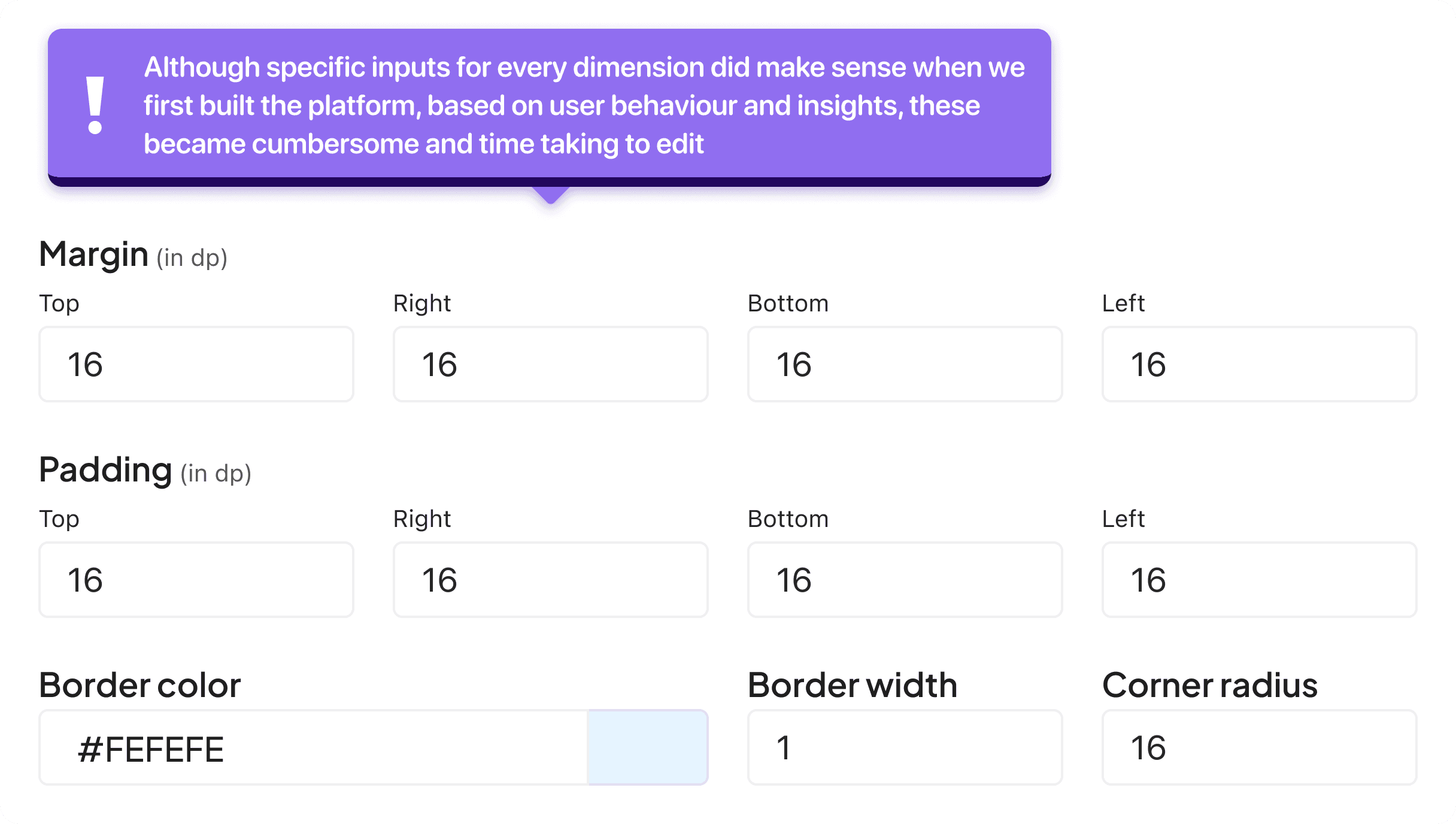
Users find margin padding for every element very confusing
Units of margin/padding in dp/pixel adds to the confusion
There were lot of redundant spacing inputs being taken from the users which again complicated the process
Units of margin/padding in dp/pixel adds to the confusion
There were lot of redundant spacing inputs being taken from the users which again complicated the process
Solving for element selection and auxiliary functions
Solving for element selection and auxiliary functions
Solving for element selection and auxiliary functions
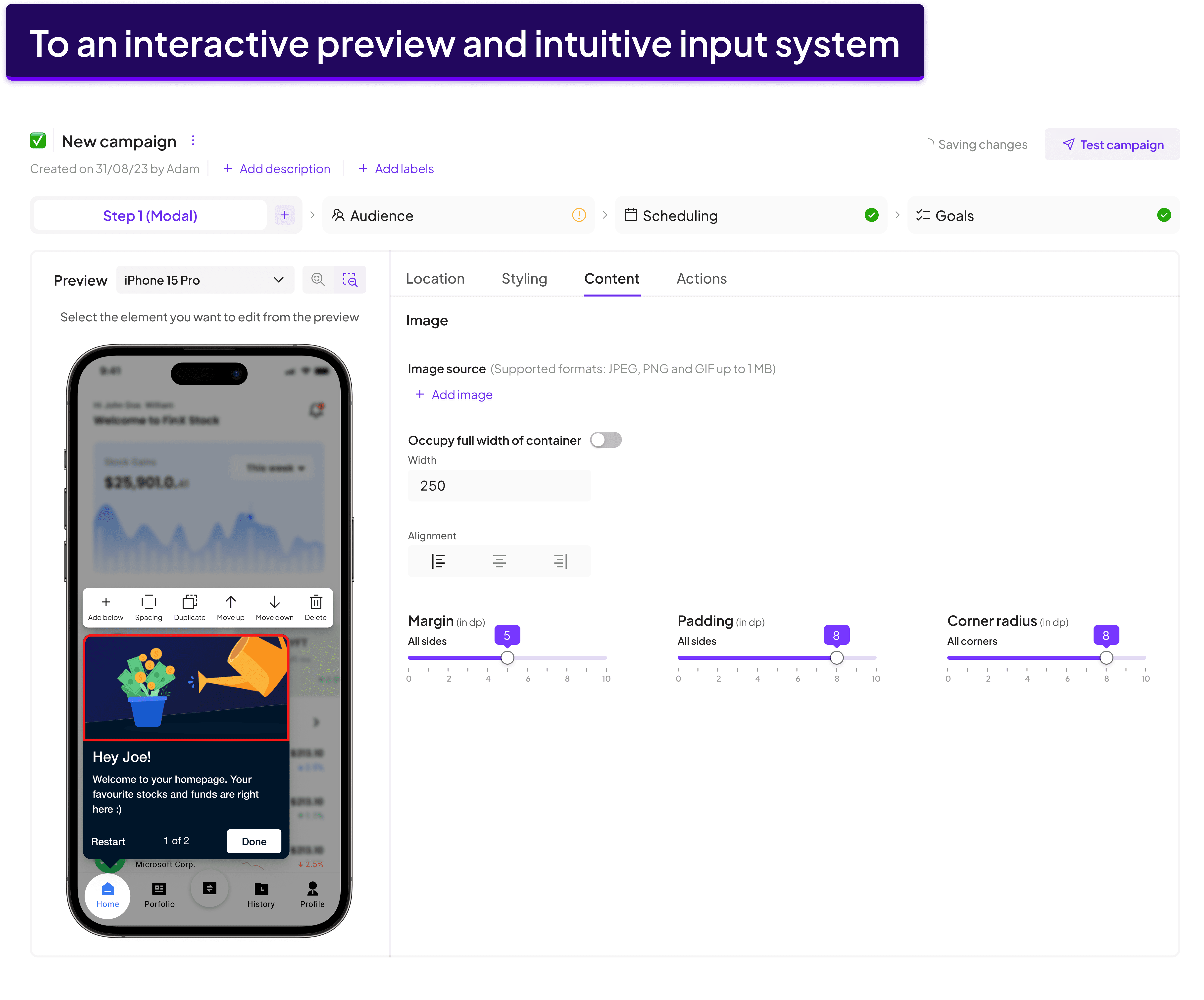
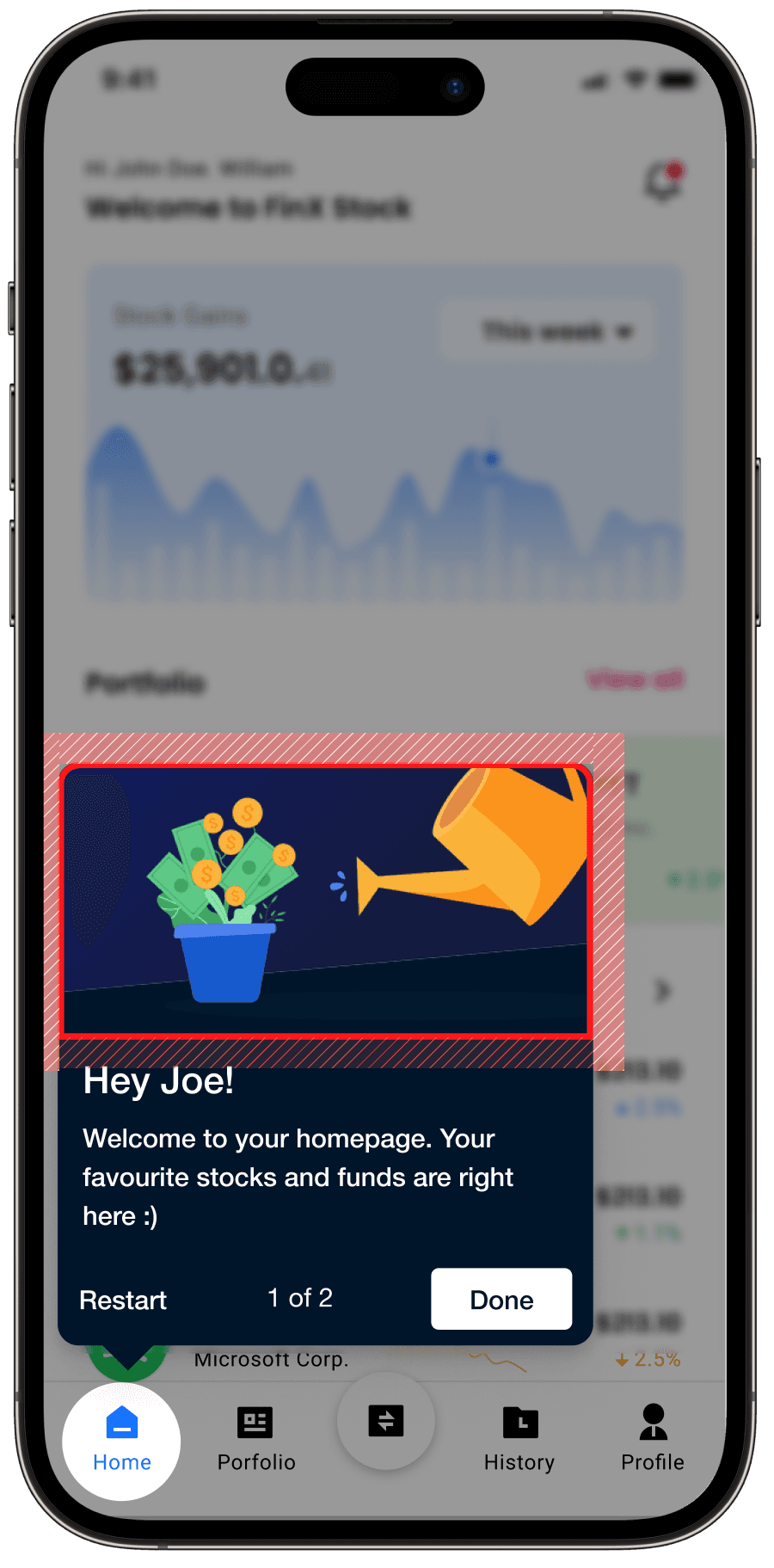
One of the main problem areas was the difficulty of element selection. That's why building an interactive preview was prioritised so that users can easily hover, click, move, select and delete elements directly from the preview.
One of the main problem areas was the difficulty of element selection. That's why building an interactive preview was prioritised so that users can easily hover, click, move, select and delete elements directly from the preview.
One of the main problem areas was the difficulty of element selection. That's why building an interactive preview was prioritised so that users can easily hover, click, move, select and delete elements directly from the preview.
Problem
Every element needed to be selected from a maze of accordions with generic identifiers such as Image, Body etc. If there were multiple text blocks, images, it became difficult to identify the intended element.
Problem
Every element needed to be selected from a maze of accordions with generic identifiers such as Image, Body etc. If there were multiple text blocks, images, it became difficult to identify the intended element.
Problem
Every element needed to be selected from a maze of accordions with generic identifiers such as Image, Body etc. If there were multiple text blocks, images, it became difficult to identify the intended element.
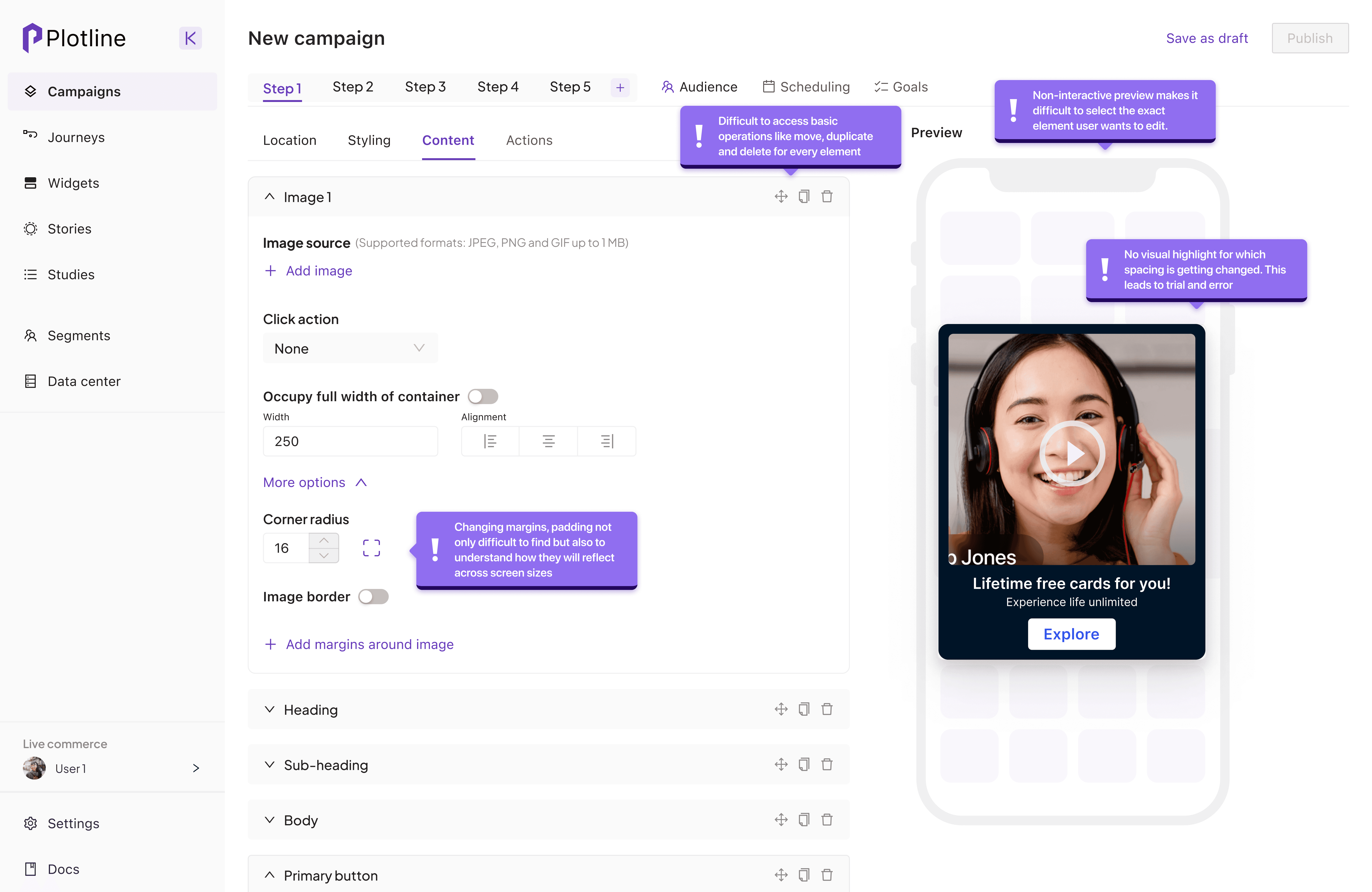
Solution
Making the preview interactive made navigating through the complex maze of accordions redundant and allowed for a much more precise and quick element selection
Solution
Making the preview interactive made navigating through the complex maze of accordions redundant and allowed for a much more precise and quick element selection
Solution
Making the preview interactive made navigating through the complex maze of accordions redundant and allowed for a much more precise and quick element selection
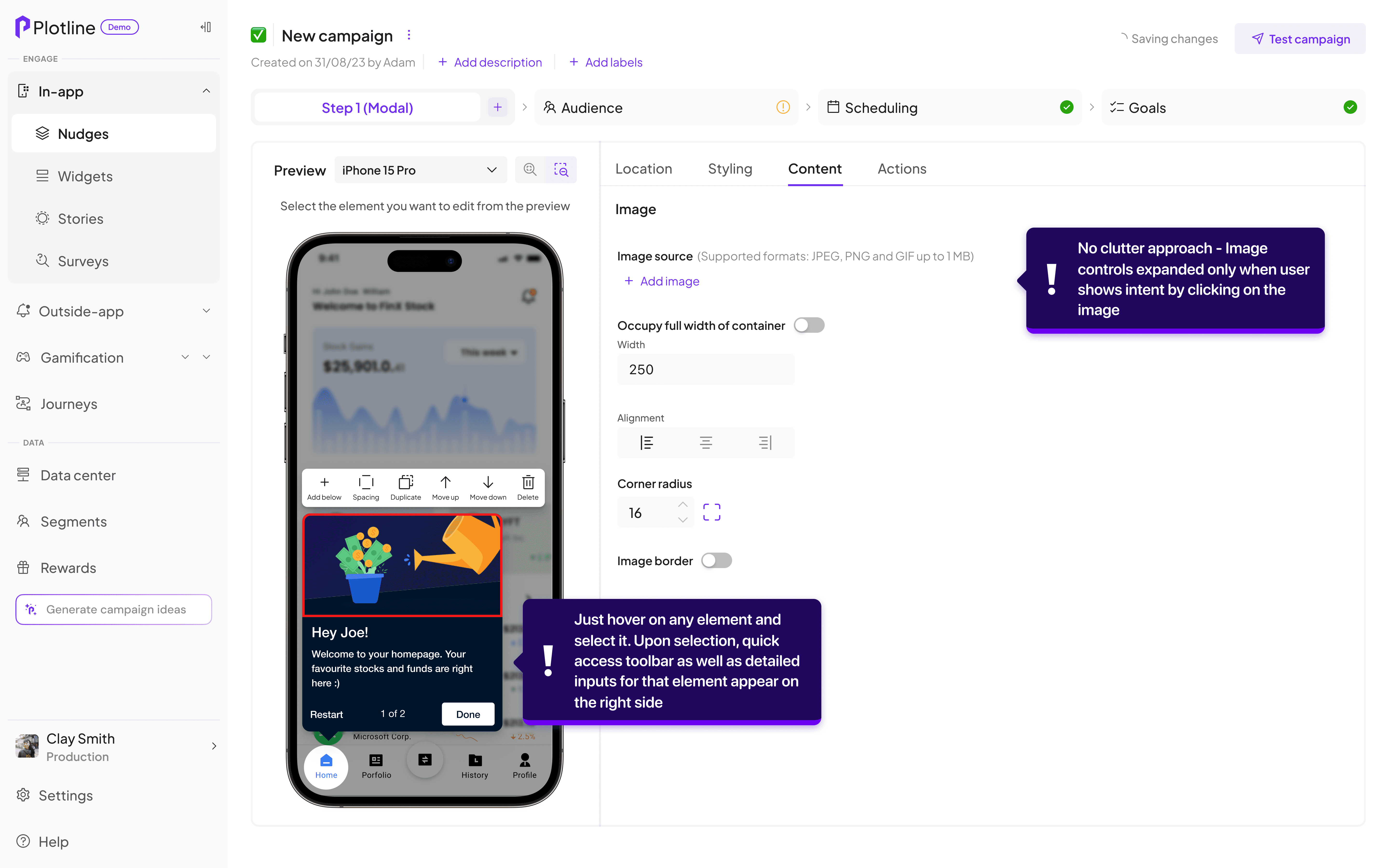
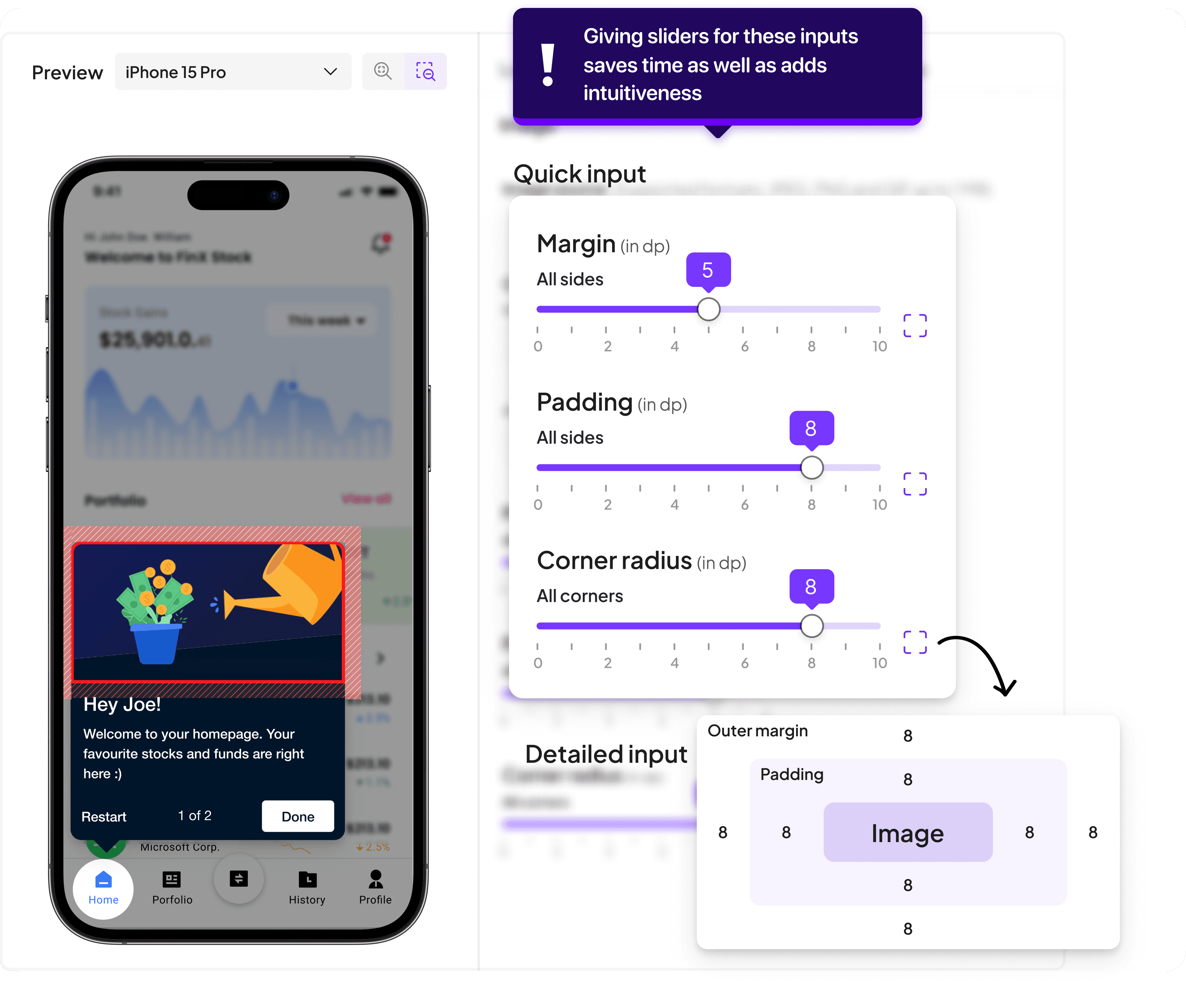
Adding a visual feedback and slider for margin/padding
Adding a visual feedback and slider for margin/padding
Adding a visual feedback and slider for margin/padding
In the secondary as well as primary research, it was evident that majority of the campaigns had content which had equal inputs for margin/padding corner radius across dimensions. Even a small change led to the user changing it 4 times which added to the time taking nature of this step.
In the secondary as well as primary research, it was evident that majority of the campaigns had content which had equal inputs for margin/padding corner radius across dimensions. Even a small change led to the user changing it 4 times which added to the time taking nature of this step.
In the secondary as well as primary research, it was evident that majority of the campaigns had content which had equal inputs for margin/padding corner radius across dimensions. Even a small change led to the user changing it 4 times which added to the time taking nature of this step.
Problem
Editing margin padding for every element individually for each side with confusing units like dp/px was very cumbersome.
Problem
Editing margin padding for every element individually for each side with confusing units like dp/px was very cumbersome.
Problem
Editing margin padding for every element individually for each side with confusing units like dp/px was very cumbersome.
Solution
Providing feedback in preview in a WYSIWYG manner removes the confusion around exactly what dimension is getting changed
Solution
Providing feedback in preview in a WYSIWYG manner removes the confusion around exactly what dimension is getting changed
Solution
Providing feedback in preview in a WYSIWYG manner removes the confusion around exactly what dimension is getting changed
Changing the base layout to facilitate a more semantic content building experience
Changing the base layout to facilitate a more semantic content building experience
Changing the base layout to facilitate a more semantic content building experience
The earlier experience was centred around selecting and editing the elements from the accordions and just seeing the changes reflected in the preview. However, the new experience made interacting with the preview the primary function of content creation and editing
The earlier experience was centred around selecting and editing the elements from the accordions and just seeing the changes reflected in the preview. However, the new experience made interacting with the preview the primary function of content creation and editing
The earlier experience was centred around selecting and editing the elements from the accordions and just seeing the changes reflected in the preview. However, the new experience made interacting with the preview the primary function of content creation and editing
Problem
Accordion based element finding and editing involved lots of inputs and compounded the time and complexity in creating nudges
Problem
Accordion based element finding and editing involved lots of inputs and compounded the time and complexity in creating nudges
Problem
Accordion based element finding and editing involved lots of inputs and compounded the time and complexity in creating nudges
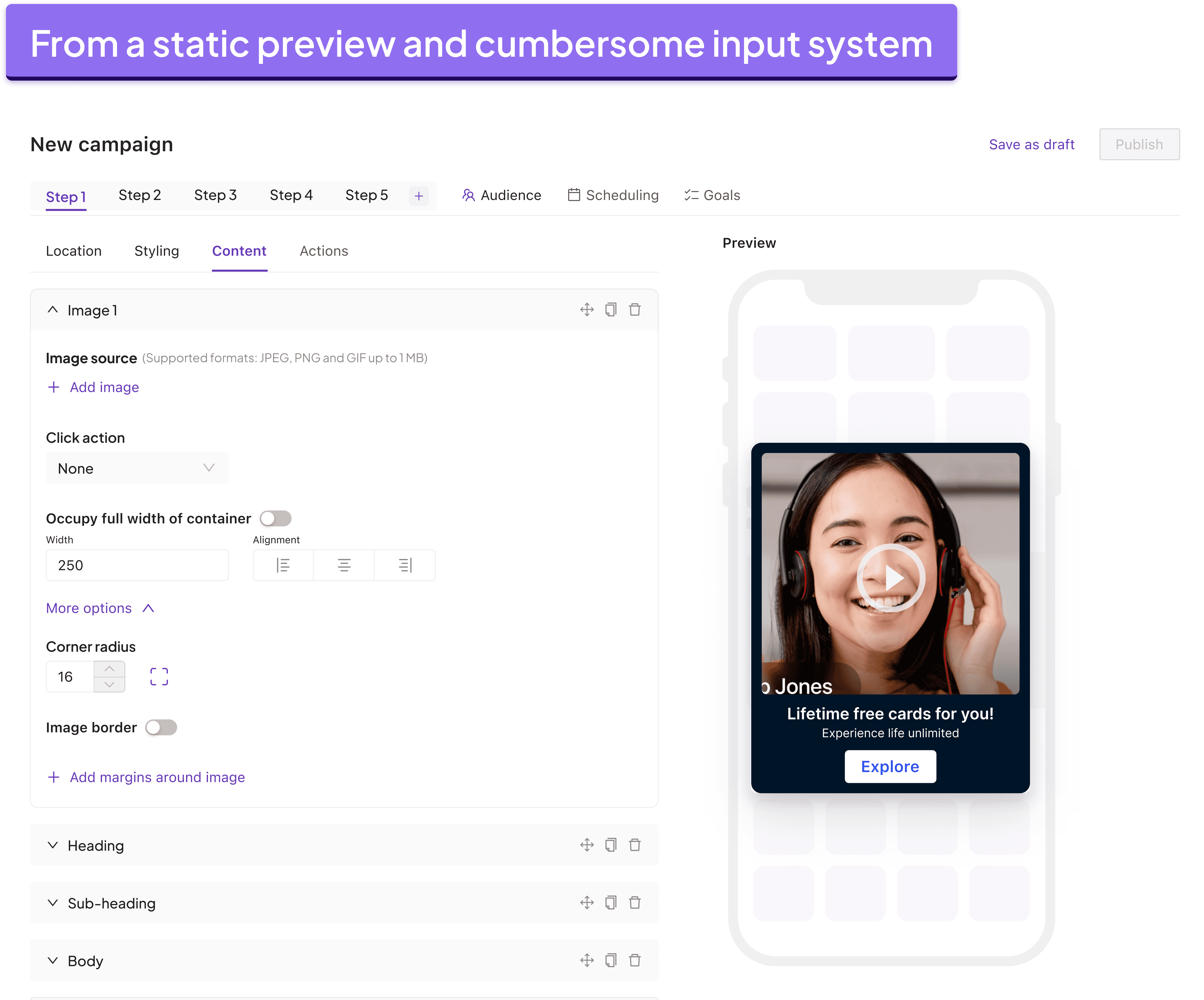
Solution
Now, preview is the first block you see and interact with highlighting its prominence
Solution
Now, preview is the first block you see and interact with highlighting its prominence
Solution
Now, preview is the first block you see and interact with highlighting its prominence
Output and outcomes
Output and outcomes
Output and outcomes
We tested the new interactive builder approach with marketers. Job to be done was kept the same - Building a 4 step onboarding campaign for their end users.
We tested the new interactive builder approach with marketers. Job to be done was kept the same - Building a 4 step onboarding campaign for their end users.
We tested the new interactive builder approach with marketers. Job to be done was kept the same - Building a 4 step onboarding campaign for their end users.

Time taken to create the campaign content reduced from ~15-20 mins to ~4-5 mins.
Users said that directly selecting the element they wanted to edit was much more intuitive than matching the layers in accordions as before
Visual cues on the dimension being changed greatly helped in 1:1 relevance while editing.
Time taken to create the campaign content reduced from ~15-20 mins to ~4-5 mins.
Users said that directly selecting the element they wanted to edit was much more intuitive than matching the layers in accordions as before
Visual cues on the dimension being changed greatly helped in 1:1 relevance while editing.
Time taken to create the campaign content reduced from ~15-20 mins to ~4-5 mins.
Users said that directly selecting the element they wanted to edit was much more intuitive than matching the layers in accordions as before
Visual cues on the dimension being changed greatly helped in 1:1 relevance while editing.
Many parts of this project are proprietary and not available to be shown here. I would be happy to go over the complete thought behind it and the current implementation in our dashboard over a call anytime!
Many parts of this project are proprietary and not available to be shown here. I would be happy to go over the complete thought behind it and the current implementation in our dashboard over a call anytime!
Many parts of this project are proprietary and not available to be shown here. I would be happy to go over the complete thought behind it and the current implementation in our dashboard over a call anytime!